Payroll Exports
The payroll export allows you to set how you want to export the payroll. The payroll exports setting is mandatory to export employees' payroll data on the Export Payroll screen.
Note - Permission: The employees with the pay period settings permission will be able to access pay period settings, the payroll export feature, and the export payroll screen. Refer to permission for more details.
- Click Pay Period Settings below Setup.

- Click on the Payroll Exports tab.
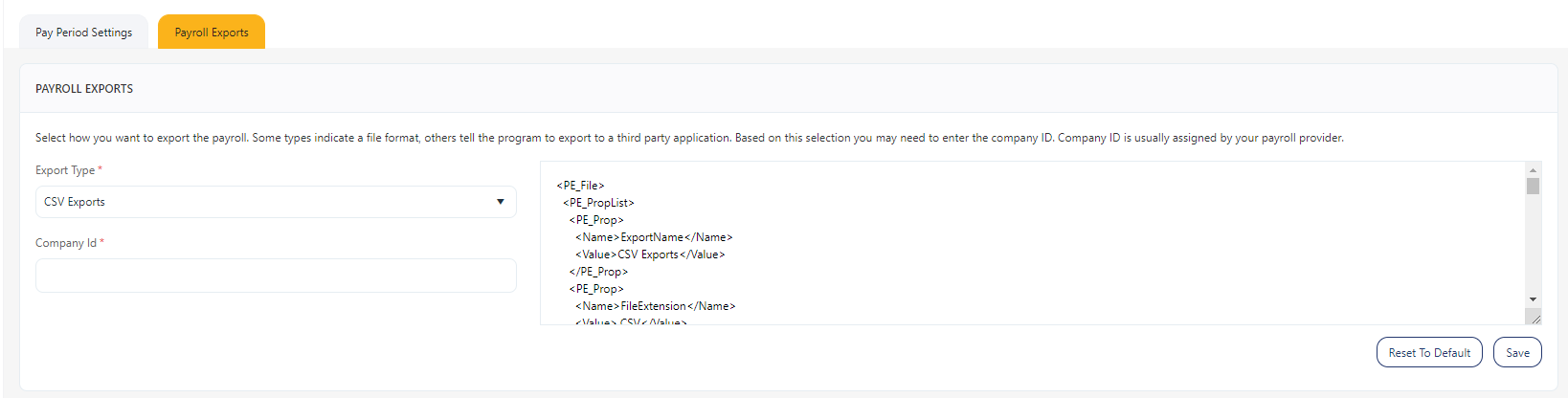
- Export Types - Select the export type. The options are None, ADP EZPay Exports, CSV Exports, Pay Choice, PayChex /Sum Hours, PayChex / Time in a Box Export, Sage 50 Payroll, ADP Exports, CSA Exports, Dr Comforts, QuickBooks IIF File and ROW Exports.
- Note: PayChoice - If you are using PayChoice, your payroll codes must match those used by PayChoice. Acceptable codes as of this writing are 01 - Regular, 02 - Overtime, 03 - Vacation, 04 - PTO, 05 - Holiday 08 - Other, 13 - Bonus, and 14 - Commission.
These codes are subject to change by PayChoice at any time. We recommend that you confirm the current pay codes with PayChoice before inputting them into your software.
- Company ID - Enter the company ID. The company ID will be disabled for some export types.
- Text Editor - It will display the XML content based on the payroll export option selected (point 4). There will be two buttons Save and Reset to default. The user can edit the XML content and save or use the default content. The "Reset to default" will undo the changes and will display the default content.
- Click Save.